

One in eight credential slots in public MCP config files holds a real secret, typed straight into the file. That is the headline number from Hush Security's analysis of about 82,000 MCP configuration files on public GitHub, published this week. Precisely, 12% of credential slots hardcode a credential literal.
Two caveats before we go further. Hush sells identity security products, and their own report is upfront about its limits: they never tested whether a key still worked, GitHub code search only covers default branches and excludes forks, and they call their own numbers a floor rather than a count. A review of the study by the outlet The Clarity adds a sharper point: nobody outside Hush has seen the underlying 82,000 files or their classifier, several of the headline percentages are published without the group sizes behind them, and the CEO's line that there is "a whole population of access tokens sitting out in public Git with no one watching" reaches further than the 243 recoverable secrets out of 7,681 traced histories can support on their own. The direction of the finding still holds, and it is easy to fall into. Here is why it happens and how to stop it.
Why MCP configs leak
Your .env file is something you already know not to commit. MCP config files are the opposite. .mcp.json, .cursor/mcp.json and .vscode/mcp.json are designed to live in the repository so a team can share its agent tooling. Paste a GitHub token into the env block of a file that is meant to be committed, and the leak is one git push away.
The rest of Hush's numbers are worse than the headline:
- **Scanners miss most of it.** 55% of the hardcoded secrets have no recognizable token shape, which is the signal that tools like gitleaks, trufflehog and GitHub secret scanning rely on. Hush names what actually turned up: GitHub personal access tokens, Anthropic and OpenAI API keys, Slack and Notion workspace tokens, and database connection strings, alongside opaque bearer tokens minted for internal MCP servers, which alone account for 31% of every hardcoded secret they found, not just the shapeless majority.
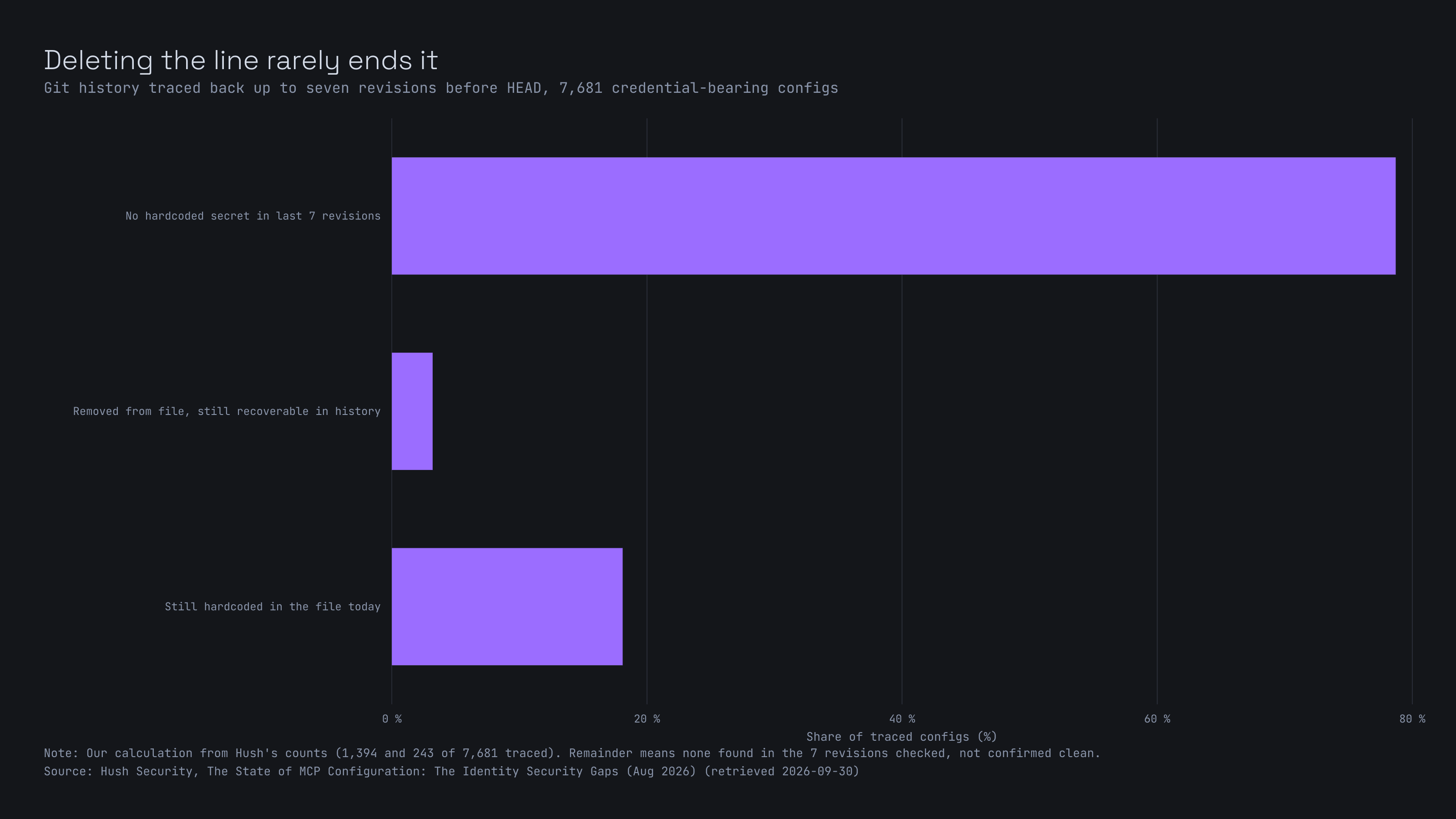
- **Deleting the line doesn't help.** Of the 7,681 credential-bearing configs Hush traced back through history, 243 had a secret removed from the current file that was still readable in an earlier commit, and another 1,394 still carry the hardcoded secret in the file today, unchanged.
- **The keys are powerful and long-lived.** Of leaked credentials with a defined scope, 53% were organization-, account-, workspace- or database-wide. Of those with a defined expiry policy, 80% never expire by default.
So the goal is simple: the secret never enters the file, and whatever secret does exist can do as little as possible.
Fix 1: keep the secret out of the file
Every major client has a way to do this. They are not compatible with each other, which is the annoying part.
Claude Code
.mcp.json supports environment variable expansion, per the Claude Code docs. ${VAR} expands to the variable's value, and ${VAR:-default} falls back to a default. It works in command, args, env, url and headers.
{
  "mcpServers": {
    "api-server": {
      "type": "http",
      "url": "https://api.example.com/mcp",
      "headers": {
        "Authorization": "Bearer ${API_KEY}"
      }
    }
  }
}
The pitfall: if APIKEY isn't set and there is no default, the config still loads and the literal text ${APIKEY} gets used as-is. Claude Code shows a warning in claude mcp list, but the server itself starts and then fails at authentication. Run that command after any change.
VS Code
VS Code uses a different root key (servers, not mcpServers) and a different mechanism. You declare an input, and VS Code prompts for the value the first time the server starts and stores it outside the file.
{
  "inputs": [
    {
      "type": "promptString",
      "id": "service-token",
      "description": "Service API token",
      "password": true
    }
  ],
  "servers": {
    "my-service": {
      "type": "stdio",
      "command": "npx",
      "args": ["-y", "@example/my-service-mcp"],
      "env": {
        "SERVICE_TOKEN": "${input:service-token}"
      }
    }
  }
}
Cursor
Cursor resolves ${env:NAME} in command, args, env, url and headers.
{
  "mcpServers": {
    "remote-server": {
      "url": "https://api.example.com/mcp",
      "headers": {
        "Authorization": "Bearer ${env:MY_SERVICE_TOKEN}"
      }
    }
  }
}
Do not copy the VS Code inputs block into Cursor. According to a Cursor team member on their forum, an inputs array in mcp.json is silently ignored, and the ${input:...} references never resolve. The server just starts without the credential.
One file, several clients
If a single committed config has to work everywhere, none of the client-specific tricks are safe. The plainest option is each developer setting the variable in their own environment, plus a README that says which variables to set.
Claude Desktop
This is the awkward one. Users report that claudedesktopconfig.json has no ${VAR} expansion at all, and there are open GitHub reports of the desktop apps passing the literal placeholder string to the server instead of the resolved value. Treat the env block there as literal-values-only and don't rely on expansion. Two better routes exist: packaged extensions (.mcpb), where fields marked sensitive: true are stored in the OS keychain, or the approach below.
Fix 2: for local servers, let the server load its own secrets
If you write your own local MCP servers, there is an option that works in every client: keep secrets out of the client config entirely. The config only says how to launch the server, and the server reads its own .env file at startup.
{
  "mcpServers": {
    "my-server": {
      "command": "node",
      "args": ["/absolute/path/to/my-server/dist/index.js"]
    }
  }
}
import dotenv from "dotenv";
import path from "node:path";
import { fileURLToPath } from "node:url";
// Resolve .env relative to this file, not the working directory.
// The client decides the working directory, and it is rarely your project folder.
const here = path.dirname(fileURLToPath(import.meta.url));
dotenv.config({ path: path.join(here, "..", ".env") });Then lock the file down, and do it before the project ever sees git init:
printf '.env\nnode_modules/\n' >> .gitignore
chmod 600 .env
chmod 600 makes the .env readable only by your user account. The .gitignore matters because the dangerous moment is the day you decide to push a project to GitHub and run git add . on a directory that never had one.
Fix 3: scope it like it will leak
Most guidance stops at "keep it out of Git". Assume it leaks anyway and shrink what it can do.
We ran this audit on our own setup, which is still new and rough around the edges. That is exactly why it was worth doing. Scoping turned out to be uneven. Some credentials were already narrow, limited to the handful of actions their job needs, or belonging to free, rate-limited services where the worst case is boring. Others were far broader than the job. One integration was running on a full admin login when all it needed was permission to upload files. One leaked .env would have handed over the whole admin panel, when the honest blast radius for that job is "can upload files".
The fix is a dedicated role or account with only the permission the integration needs. Do the same audit on yours. For each credential, ask what it could do in the wrong hands, whether it expires, and whether a narrower one exists. GitHub fine-grained tokens, read-only database users and per-project API keys are all the same idea.
Already committed one? Do this in order
- **Rotate the credential at the provider. Do this first.** Deleting the line from the file changes nothing, because the old commit still holds the value and GitHub keeps serving it. Rotation is the only step that ends the exposure.
- **Then clean the history**, if you want to. This tidies the record but does not undo copies that already exist in clones, forks and caches. Put each leaked value on its own line in a text file kept outside the repo, then run:
git filter-repo --replace-text expressions.txt
You will need git-filter-repo installed and a force push afterwards.
- **Check everywhere else the same secret lived.** Old commits, CI variables, a colleague's laptop, a pasted bug report.
Check your own repos in ten seconds
This one-liner lists the names of any env or headers entries in an MCP config that do not use a variable reference. It prints names only, never values:
jq -r '.. | objects | (.env?, .headers?) | select(. != null)
  | to_entries[] | select(.value|tostring|test("\\$\\{")|not) | .key' .mcp.json
Anything it prints is a slot holding a literal. Run it against .cursor/mcp.json too. VS Code files use ${input:...}, which the pattern also treats as safe. It is a crude check, and a variable name it doesn't flag can still hold a secret in some other way, but it catches the mistake Hush found most.
One more reason to run that check yourself: official tooling doesn't cover this yet. GitHub's own MCP server now ships a secret-scanning tool your agent can call before you push, but as of this writing it only works through GitHub's remote MCP server, not the local, stdio-based servers this whole guide is about, and its findings live in that one chat session rather than your repository's Security tab. The gap holds for now.
The bigger picture
Hush's own recommendation is to move to short-lived, identity-based credentials brokered from a secure location. That is the right long-term direction for a company running dozens of agents. One piece of advice already circulating elsewhere is to fix this by upgrading to the newer MCP specification, 2026-07-28. Skip it: that revision's authorization hardening is entirely about the OAuth flow for remote, HTTP-based servers, and it explicitly tells local, stdio-based servers, exactly what this article covers, to keep pulling credentials from the environment as before. There is no version bump that fixes a config file with a password typed into it.
For a solo developer or a small team, the boring version gets you most of the way: secrets in a file only your user can read, outside version control, scoped to the smallest job, with a rotation plan.
The safest credential is the one that lives on your machine, touches nothing it doesn't have to, and can't do much even if it walks out the door. MCP made it very easy to hand AI agents the keys to your stack. Take five minutes and check what you handed over.
About the Author