
In June I tried to turn the RX 580 in my home server into a private AI assistant, using Odysseus on top of Ollama with ROCm. It ran like absolute garbage, and I deleted it the same afternoon. In November I tried again with a different backend. The same 8 GB card from 2017 now runs a 9B model fully on the GPU at about 26 tokens per second, with a 128k context window.
The short answer: yes, an RX 580 can still run local LLMs in 2026. Skip ROCm, which dropped support for this card years ago, and use llama.cpp with its Vulkan backend on a normal Linux install. Stick to models around 9B at Q4, or a mixture-of-experts model partly offloaded to system RAM. Then check what your chat interface is sending, because that turned out to be the second bottleneck.
That second part surprised me. I sent one short message to the same model on the same card through two chat interfaces. Open WebUI sent 7,442 prompt tokens, and llama.cpp's built-in page sent 2,222. The first word took about 46 seconds to appear in Open WebUI and about 13 seconds in llama.cpp. Open WebUI then kept the GPU busy for almost 4 minutes in total, against about 29 seconds. On an old card, what your chat UI sends matters about as much as the GPU itself.
Here's what happened, every error that cost me time, and the numbers. All the config files are at the end if you want to copy the setup.
The setup
The server is an HP Z440 workstation (Xeon E5-1660 v4, 32 GB ECC) running Proxmox. The GPU is a Sapphire Nitro+ RX 580 8 GB, AMD's Polaris generation, or gfx803 in AMD's naming. Mine spent its life in my gaming PC before it ended up here.
If you have one lying around, there's a good chance it has a past. The RX 570 and 580 were the classic budget mining cards of 2017 and 2018. Ethereum's mining algorithm leaned on memory bandwidth more than raw compute, so 8 GB of fast GDDR5 at a mid-range price made them a favourite, and miners bought them by the rack. That ended on 15 September 2022, when Ethereum's "Merge" switched it from proof-of-work to proof-of-stake and GPU mining of ETH stopped paying overnight. Some miners moved to smaller proof-of-work coins like Ethereum Classic, but the profits weren't there, and a lot of those cards ended up on the secondhand market. So there are plenty of 8 GB RX 580s out there, in old rigs, drawers and retired gaming PCs, and the question is whether they can do anything useful now.
Why Ollama and ROCm failed on the RX 580
The first attempt was Ollama in a Proxmox container, with Odysseus as the front end. If you haven't come across it, Odysseus is a free, open-source, self-hosted AI workspace that PewDiePie (Felix Kjellberg) released on 31 May 2026, after building it in public on his channel. Think ChatGPT's or Claude's web interface, but running on your own hardware, with chat, agents, deep research, documents, notes and an email client built in. That email client is why I wanted it: an assistant that reads my email and flags what matters, without any of it leaving the house. I tried it less than two weeks after launch.
Ollama used AMD's ROCm for AMD GPUs, and ROCm dropped Polaris a long time ago. Ollama's own GPU docs list ROCm support starting at gfx908, several generations newer than this card. The usual workaround is to tell ROCm the card is something else:
HSA_OVERRIDE_GFX_VERSION=8.0.3
That got the card recognised, but only with manual limits on how much of the model went to the GPU and a cramped 8k context. Then Odysseus's tools stopped responding and the chat froze. Nothing really fixed it, and two hours later I destroyed the container. (Before the RX 580, I'd tried an old Quadro K2200, which died on Failed to initialize NVML: Driver/library version mismatch because the Nvidia libraries in a container must match the host driver exactly.)
To be fair to Odysseus, it probably wasn't the problem on its own. It ran on the worst backend for this card, and it sends a lot of tokens with every request, including the definitions of every tool it has. An agent workspace has to work that way. But when reading the prompt is your bottleneck, every extra token costs seconds, as the numbers further down show.
Now that I know where the real bottleneck was, I'm planning to give Odysseus another go. It's had months of active development since I tried it in a container in June. When I ran it on my Mac in Docker, I pointed it at Ollama's OpenAI-compatible endpoint, and llama-server speaks the same kind of API, so I should be able to put Odysseus on top of the Vulkan setup instead of Ollama on ROCm. On a backend that actually uses the card properly, it may well do better than I expect. Its tool definitions will still cost seconds on every request, though, so the fewer tools I switch on, the better. I haven't tried that combination yet.
One update since June: Ollama's docs now say Vulkan is enabled by default when that backend is installed. I haven't tested it on this card, but if you'd rather stay with Ollama, try that before you touch ROCm.
How to run local AI on an RX 580: llama.cpp with Vulkan
The November setup drops ROCm completely. llama.cpp, the engine under a lot of local AI tools, has a Vulkan backend, and Mesa's open-source RADV driver supports the RX 580 properly. You don't need an override or any AMD software, just the normal Linux kernel driver and Mesa. Instead of a container, I gave the card to a full virtual machine.
GPU passthrough. On Proxmox this means turning on the IOMMU and handing the card to vfio-pci so the host leaves it alone. On the Z440, VT-d hides in the BIOS under Security, then System Security. Proxmox also logs failed to reset PCI device every time the VM starts, because Polaris doesn't support its preferred reset method. In months of switching the card between three VMs, that warning has never caused a problem.
The Debian image trap. Debian's cloud images come in generic and genericcloud versions. The genericcloud kernel is slimmed down and has no amdgpu driver, so the card never shows up. Use debian-13-generic-amd64.qcow2. With Mesa's Vulkan drivers installed, vulkaninfo should list AMD Radeon RX 580 Series (RADV POLARIS10).
Building llama.cpp. It's one flag:
cmake -B build -DCMAKE_BUILD_TYPE=Release -DGGML_VULKAN=ON
cmake --build build --config Release -j12
Give the VM plenty of RAM for this. With 4 GB and no swap, the Vulkan shader generation ate everything, the VM locked up and SSH died with Connection timed out during banner exchange. With 20 GB, it built in about four minutes.
Running it as a service. Under a system user with no home directory, llama-server complained on every start:
Failed to create /home/llama for shader cache (Permission denied)---disabling.
Point MESASHADERCACHEDIR at a cache directory in the systemd unit and it goes away. I also use llama.cpp's router mode, which lists several models in one ini file and loads whichever one a request asks for. Restart the service after editing that file, because it isn't re-read on its own.
Fitting 128k of context in 8 GB. I quantize the KV cache to q80, which failed the first time with:
quantized V cache requires flash_attn to be enabled
Turn flash attention on and it works. At q80, a 9B model's cache costs about 16 KB per token.
A power cap that actually holds
The RX 580 is rated for 175 W. I capped it at 125 W, partly for heat (Cyprus summers are not kind to hardware), and the cap doubled as an undervolt: under load the card ran at about 1.0 V instead of 1.15 V.
Setting the cap takes one line. Making it stick took three attempts. When the card idles it drops into a sleep state, and waking up resets the cap to 175 W, so you have to keep it awake as well as capped. My second attempt put a shell expression straight into the systemd unit's ExecStart, and systemd expanded it itself before the shell ever saw it:
Invalid environment variable name evaluates to an empty string: c%%/hwmon/*
Worse, it looked like it worked, because the card was still awake from an earlier try, so it ran uncapped from the next boot onward. Moving the logic into a small script fixed it (it's at the end). The trade-off is about 33 W at idle, since the card never sleeps. Polaris also treats the cap as an average, peaking at 143 W while averaging 125 W, which is normal.
How fast is an RX 580 for local LLMs?
All numbers are at 125 W with Q4KM models and a q80 cache.
A 9B model, fully on the GPU: Ornith 1.5 9B reads prompts at 179 tokens/s and generates at 26.3 tokens/s with an empty context, dropping to 141 and 22 with 16k in the conversation, and 95 and 16.5 at 49k. Qwen3.8 9B performs about the same. The card peaked at 75 °C under ten minutes of full load.
A 35B mixture-of-experts model: Qwen3.6 35B-A3B is 21 GB, but only about 3B of its parameters are active per token, so part of it can live in system RAM. With llama.cpp's n-cpu-moe set to 30, it runs at 19.2 tokens/s (17.7 at 16k) using about 6.7 GB of VRAM. It's smarter than the 9Bs, though far from frontier.
What doesn't work: big dense models. A 27B or 31B ends up mostly on the CPU at 3 to 6 tokens/s. Huge contexts aren't worth it either: 128k works on the 9Bs, but filling it from cold takes 15 to 20 minutes, and quality drops long before then.
Why Open WebUI is slow on old GPUs
On this card the bottleneck isn't generating text, it's reading the prompt. A 9B reads about 170 tokens per second, so every 1,000 tokens your chat interface adds costs about six seconds before the first word appears. You never see those tokens, but you wait for them.
So I measured it. Fresh boot, Qwen3.8 9B loaded, and the same message sent in a new chat in each interface, one after the other:
Give me three tips for keeping a GPU cool in a dusty room.
The llama.cpp page wasn't stripped down: it had a system prompt and two MCP tool servers enabled. Open WebUI 0.13.4 had no persona, no system prompt and web search off. Every number comes from llama-server's own timing log.
The llama.cpp page sent 2,222 prompt tokens and the first word appeared after about 13 seconds. The 414-token reply was done at 29.3 seconds, and the GPU was idle again about 29 seconds after I hit send.
Open WebUI sent 7,442 prompt tokens and the first word appeared after about 46 seconds. The 407-token reply, slowed by a request running alongside it, was done at 63.3 seconds. The GPU then stayed busy until 3 minutes 51 seconds after I hit send.
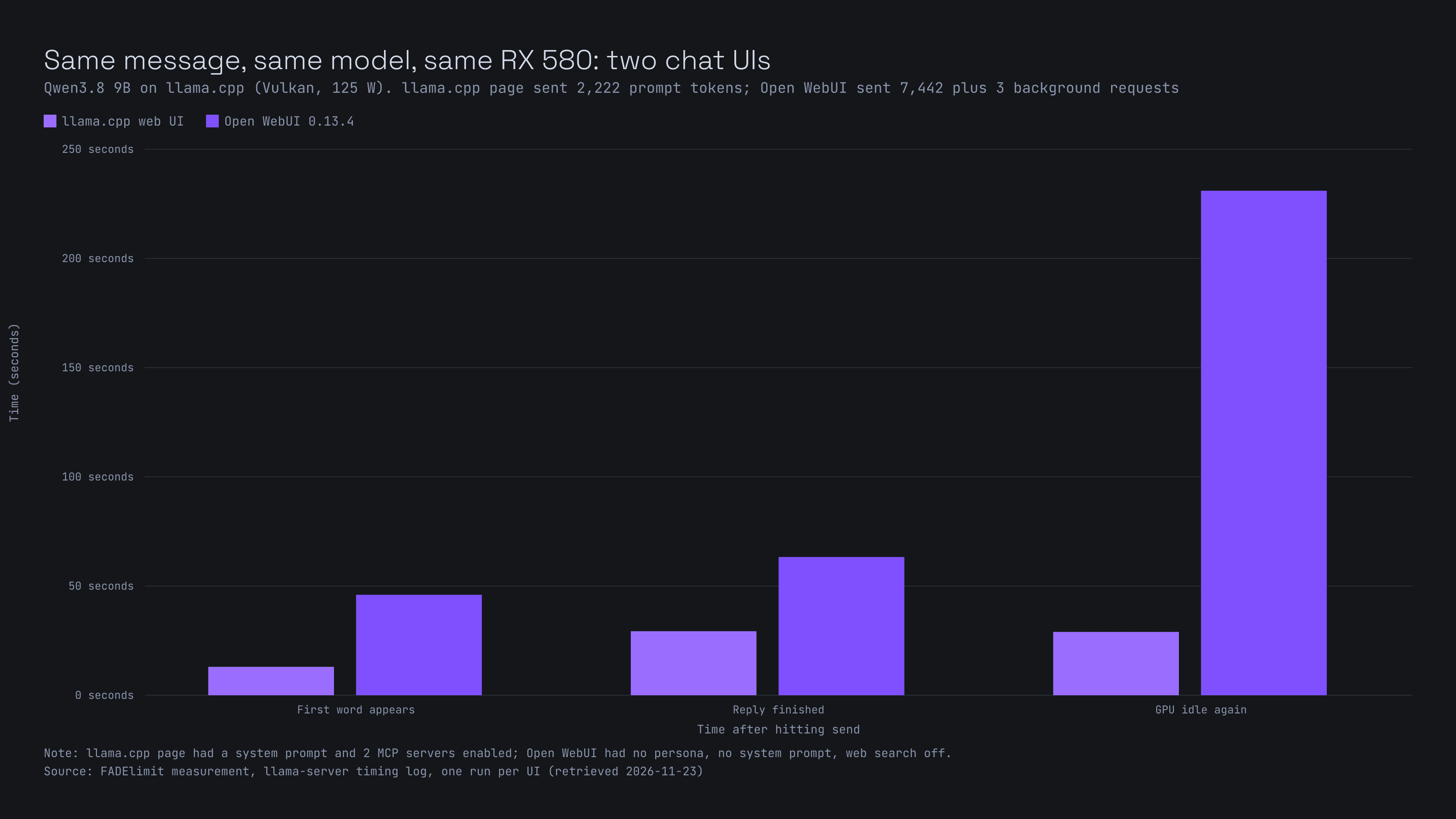
That's because Open WebUI fired three background requests. One ran in parallel with the chat and was starved down to 3.3 tokens/s. After the reply, another generated 3,759 tokens over 153 seconds. According to the chat record, the three jobs produced a title, one tag and five follow-up question suggestions. The log doesn't say which job made which, but the 2.5-minute one is most likely a reasoning model thinking hard about five short follow-up questions. None of it shows in the chat.
With tools, a persona and memories on, it gets worse: in an earlier session, a one-line message to the 35B model became an 8,000-token prompt that took 95 seconds just to read. The coding agent opencode has the same issue, at about 10,000 tokens of instructions and tool definitions per new session.
None of this makes Open WebUI bad software. On a 4090, 5,000 extra tokens costs half a second. On a 2017 card it's the difference between usable and not. Turn off title, tag and follow-up generation, enable only the tools you use, and consider setting llama-server's parallel slots to one (np = 1) so background jobs can't run alongside your chat. I haven't tested those changes yet, so I can't give numbers for them. For quick chats I just use llama.cpp's own page.
Smaller things that will bite you
Hugging Face downloads redirect to a CDN, so curl without -L saves nothing. Small models get their own identity wrong: one of my 9Bs told me it was Claude, made by Anthropic. A system prompt fixes that. And llama-server has no password by default, so anyone on your network can use it. Add --api-key if your network isn't only you.
Is an RX 580 worth it for local AI?
Yes, as long as you don't expect a frontier model. A card that a lot of people retired after mining or gaming runs a capable 9B at 26 tokens per second with 128k of context, fully on the GPU at 125 W. For coding help, quick questions and drafting, that's genuinely usable, and no prompt ever leaves my house. After June I'd written the card off. Now my RX 580 has a life again.
For comparison, the RTX 2080 Ti (11 GB) in my gaming rig runs Gemma 4 12B at 40 to 50 tokens/s at 128k context, capped at 170 W. That's what three more GB of VRAM and CUDA buy you.
If you have an old AMD card in a drawer, here's the short version. Skip ROCm. Use llama.cpp with Vulkan, or Ollama's Vulkan backend if you prefer Ollama. Give the GPU a full VM, cap its power, and check how many tokens your chat interface sends before you blame the hardware.
Full configs
Everything below is exactly what runs on my server, for anyone who wants to copy the setup. The PCI IDs are an RX 580's, so check yours with lspci -nn.
Proxmox host: GPU passthrough
In /etc/default/grub, then run update-grub and update-initramfs -u and reboot:
GRUB_CMDLINE_LINUX_DEFAULT="quiet intel_iommu=on iommu=pt"
# /etc/modprobe.d/vfio.conf
options vfio-pci ids=1002:67df,1002:aaf0
softdep amdgpu pre: vfio-pci

# /etc/modprobe.d/blacklist-amdgpu.conf
blacklist amdgpu
blacklist radeon

# /etc/modules-load.d/vfio.conf
vfio
vfio_iommu_type1
vfio_pci
The VM
qm create 102 --name llm --ostype l26 --machine q35 --bios ovmf \
 --efidisk0 local-lvm:1,efitype=4m,pre-enrolled-keys=0 \
 --cpu host --sockets 1 --cores 12 --memory 20480 --balloon 0 \
 --scsihw virtio-scsi-single \
 --scsi0 local-lvm:0,import-from=/var/lib/vz/template/qcow/debian-13-generic-amd64.qcow2,discard=on,ssd=1,iothread=1 \
 --ide2 local-lvm:cloudinit --boot order=scsi0 \
 --net0 virtio,bridge=vmbr0 --vga std --serial0 socket --agent 1 --onboot 0
qm resize 102 scsi0 80G
qm set 102 --hostpci0 0000:02:00,pcie=1
Packages and build inside the VM (Debian 13)
sudo sed -i "s/^Components: main$/Components: main non-free-firmware/" /etc/apt/sources.list.d/debian.sources
sudo apt-get update
sudo apt-get install -y firmware-amd-graphics mesa-vulkan-drivers vulkan-tools libvulkan-dev glslc \
  spirv-headers build-essential cmake git pkg-config qemu-guest-agent

git clone --depth 1 https://github.com/ggml-org/llama.cpp /opt/llama.cpp
cd /opt/llama.cpp
cmake -B build -DCMAKE_BUILD_TYPE=Release -DGGML_VULKAN=ON -DLLAMA_CURL=OFF -DLLAMA_BUILD_TESTS=OFF
cmake --build build --config Release -j12 --target llama-server llama-cli llama-bench

sudo useradd --system --no-create-home --shell /usr/sbin/nologin llama
sudo usermod -aG render,video llama
/etc/systemd/system/llama-server.service
[Unit]
Description=llama.cpp server (Vulkan)
After=network-online.target
Wants=network-online.target

[Service]
User=llama
Group=llama
SupplementaryGroups=render video
CacheDirectory=llama-server
Environment=HOME=/var/cache/llama-server
Environment=MESA_SHADER_CACHE_DIR=/var/cache/llama-server
EnvironmentFile=/etc/llama-server.env
ExecStart=/bin/sh -c 'exec /opt/llama.cpp/build/bin/llama-server --models-preset "$PRESETS" --models-max 1 --host "$HOST" --port "$PORT" $EXTRA_ARGS'
Restart=on-failure
RestartSec=10
NoNewPrivileges=true
ProtectSystem=strict
ProtectHome=true
ReadOnlyPaths=/srv/models
PrivateTmp=true

[Install]
WantedBy=multi-user.target
# /etc/llama-server.env
HOST=0.0.0.0
PORT=8081
PRESETS=/etc/llama-server/models.ini
EXTRA_ARGS=
/etc/llama-server/models.ini
version = 1

[*]
c = 65536
ngl = 99
flash-attn = on
cache-type-k = q8_0
cache-type-v = q8_0
jinja = true

[Ornith-1.5-9B-uncensored]
c = 131072
model = /srv/models/Ornith-1.5-9B-uncensored.Q4_K_M.gguf
load-on-startup = true

[Qwen3.8-9B-Distill-uncensored]
c = 131072
model = /srv/models/Qwen3.8-9B-Distill-uncensored-heretic.Q4_K_M.gguf

[Qwen3.6-35B-A3B-Uncensored]
model = /srv/models/Qwen3.6-35B-A3B-Uncensored-HauhauCS-Aggressive-Q4_K_M.gguf
n-cpu-moe = 30
Power cap: /usr/local/sbin/gpu-powercap
#!/bin/sh
# Keep the AMD GPU awake and cap its power. Runtime suspend (BACO) resets the cap on wake.
set -e
WATTS=${WATTS:-125}
found=0
for cap in /sys/class/drm/card*/device/hwmon/hwmon*/power1_cap; do
  [ -e "$cap" ] || continue
  dev=${cap%%/hwmon/*}
  echo on > "$dev/power/control"
  echo $((WATTS * 1000000)) > "$cap"
  echo "$dev: control=$(cat "$dev/power/control") cap=$(( $(cat "$cap") / 1000000 )) W"
  found=1
done
[ "$found" = 1 ] || { echo "no amdgpu power1_cap found" >&2; exit 1; }
# /etc/systemd/system/gpu-powercap.service [Unit] Description=Keep RX 580 awake and cap its power limit After=systemd-modules-load.service systemd-udev-settle.service [Service] Type=oneshot Environment=WATTS=125 ExecStart=/usr/local/sbin/gpu-powercap RemainAfterExit=yes [Install] WantedBy=multi-user.target
Share this story
Share on Instagram
Instagram does not support prefilled web shares. Copy this link and paste it into a direct message or a Story link sticker.
About the Author